Controlling the Matches
You have seen a couple of ways to control the competition, but two other sheets enables an easier
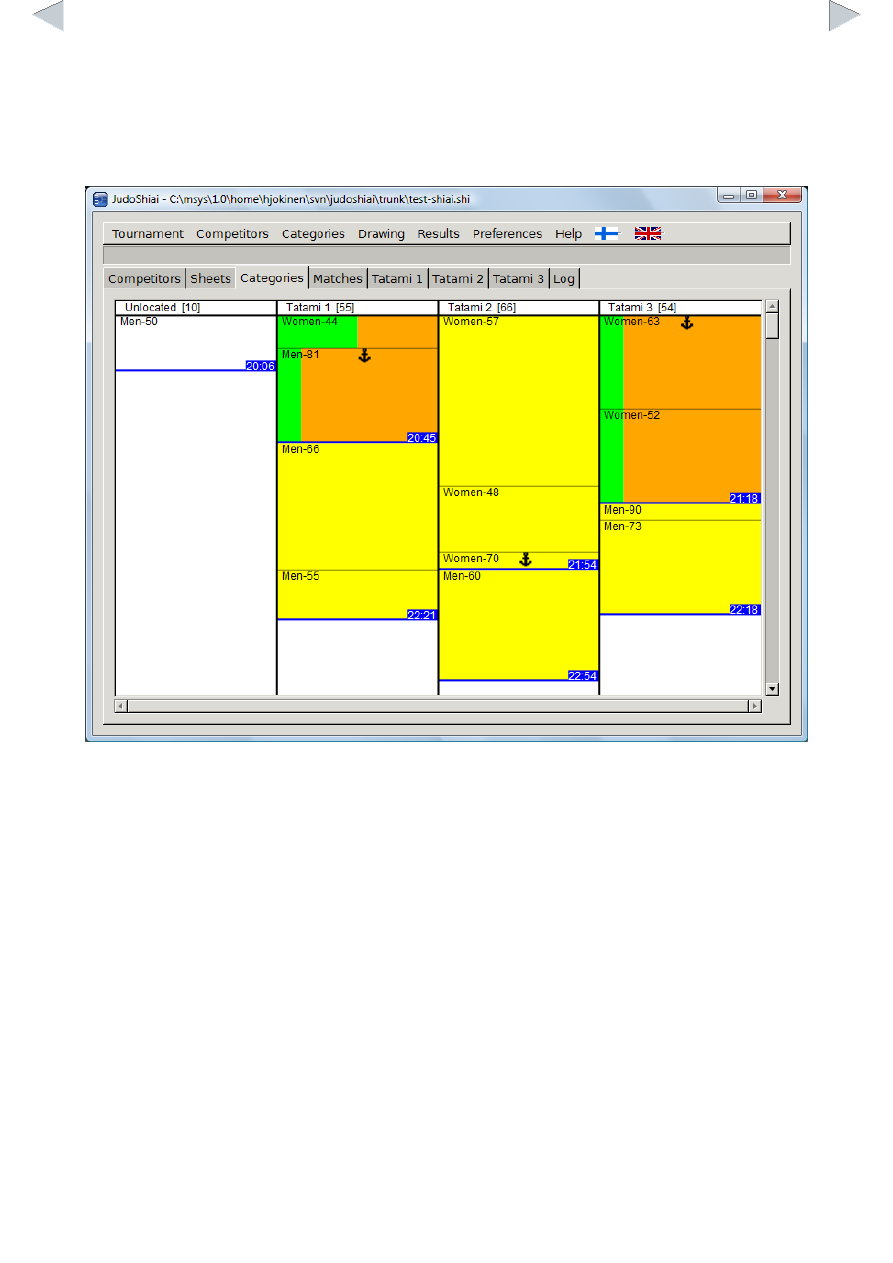
way. Categories sheet is illustrated below:
Categories are displayed by tatami. Color codes have the following meaning:
●
White: Category has not been drawn.
●
Yellow: Category has been drawn, but no fights have finished.
●
Green/orange: Finished matches/matches left.
Number of matches left is shown in brackets for each tatami. Length of the rectangle representing
the category is proportional to the number of matches left in that category, i.e. the rectangle shrinks
as the contest progresses. The blue line separates the groups from each other. The time on the
blue background is an estimate of the end time of the group's last match. An anchor symbol marks
the category who's match is starting or ongoing. You cannot move that category.
You can move the category by left clicking it and dragging it to another place. You may change
both tatami and group. One way to delay a category is to drag it to the left (column Unlocated) or
to an unused extra tatami. You may want to delay a category if there is something to correct or if
you want to delay all the medal matches.
Although the anchor prevents the moving of the category on this sheet it is possible to do on the
Competitors sheet, but be careful.
You can see the next matches on the Matches sheet: